Picked on published fit specifications, not on hands-on testing. How we pick.
The short answer
Give it one week of properly adjusted use. Mild unfamiliar aches in new places are normal as different muscles take load; worse pain in the same place, numbness, or pressure behind your knees are not, and they will not break in. Foam softens slightly - geometry does not change at all.
We earn a commission if you buy through our links. It does not change your price, and it does not change our ranking. Prices are pulled from Amazon's own API and stamped with the date we fetched them — where we have no live figure, the button opens the current price on the retailer's page instead. Full disclosure.
Ranked picks with published seat height, seat depth and weight capacity
#
Product
Best for
Seat height
Capacity
Price
1
Steelcase Leap v2
Lumbar height and firmness both adjustable
A chair with enough adjustment to tune during week one
#ad Seat height and capacity are the manufacturer's published figures, sourced under each pick. Prices come live from Amazon's own API and carry the date we fetched them; where a figure is missing the button opens the current price instead. Seat depth for every pick is in the spec block below. Seat depth summary: Steelcase Leap v2 15.75" · Steelcase Series 1 15.5"–17.75" · Everlasting Comfort Lumbar Support Pillow —
One week, and what has to happen in it
The honest answer to the question is about a week of properly adjusted use - but the phrase doing all the work there is properly adjusted. Most people assemble a chair, sit in it at whatever height it came out of the box at, and then judge it after ten days. That is not a break-in period, it is ten days of sitting in a badly set-up chair.
Spend the first twenty minutes setting it. Seat height so your feet are flat and your thighs level. Seat depth so two or three fingers fit between the front edge and the back of your knee. Lumbar support at or just above your belt line. Armrests at the height your forearms land when your shoulders are relaxed down. Recline tension so you can reach the backrest without pushing hard. How to adjust your office chair is the full order of operations, and it is the difference between a one-week adaptation and a month of discomfort.
What actually changes over time, and what does not
Break-in: what is real and what is folklore
Element
Does it change?
Over what period
Seat foam firmness
Yes, slightly - it compresses and conforms
Days to a few weeks, and then it stays
Mesh tension
Barely. Mesh is tensioned at manufacture and designed not to slacken
Never - these are the figures to get right before buying
Your own muscles adapting to a new posture
Yes, and this is most of what people call break-in
Usually a few days to a week
That fourth row is the important one and it is where most disappointment lives. A seat pan that is too long for your thighs will be exactly as long in a month. A seat that cannot come down low enough will never reach lower. If the chair is geometrically wrong for your body, time does nothing, and the return window is the only thing standing between you and a year of it. The measurements to check against are in how to measure yourself for an office chair.
Aches that are normal in week one
A properly set-up ergonomic chair often changes which muscles are working, and that can feel like soreness in unfamiliar places. The pattern to expect is mild, diffuse, in a new location, and improving day on day.
Mild soreness in the lower back or glutes after a chair that previously let you slump. You are now holding a position your old chair did for you - badly.
Awareness of the lumbar support. Noticing it is normal in the first days. Being pushed forward by it is not - that is placement or thickness.
Shoulders feeling different after armrest height changes. Your arms have been resting at the wrong height, possibly for years.
Mild stiffness from sitting more upright. Expected, and improving by day four or five.
Four signs it is not a break-in period
Symptoms that will not resolve with time, and what they actually mean
Symptom
What it means
Action
Pressure or numbness behind the knees
The seat pan is too long for your thighs
Shorten the pan if it adjusts; return it if it does not
Feet cannot reach the floor flat at any setting
The minimum seat height is above what you need
Add a footrest, or return it - this never improves
Worse pain in the same place as before, not a new place
The chair is not addressing your actual problem
Re-check the setup once, then reconsider the diagnosis
Numbness, pins and needles, or pain running down a leg
Not a furniture adaptation symptom
Stop and see a clinician - see below
The third row deserves a sentence of its own. If a correctly set-up chair makes the same pain worse rather than producing a new, milder ache elsewhere, the most likely explanation is that the chair was never the variable - can office chairs cause back pain goes through what else at a desk produces the same symptoms, and screen height is at the top of that list.
Mind the return window
Practical point that matters more than any of the physiology. Work out your return deadline on day one and write it down. Then plan to have the chair fully adjusted within the first two days, so your evaluation week falls inside the window rather than after it. A chair you have decided about on day twenty-five is a chair you own.
It is also worth checking the warranty terms in that first week, because that is when manufacturing faults show up - a gas lift that will not hold height, a tilt lock that does not lock, a caster that binds. A chair that sinks in week one is a faulty cylinder rather than a settling-in period; why office chairs sink and what to do has the test. How long office chairs last explains why warranty term is the figure to read.
If a week passes and it is still wrong
Run three questions. Did you actually adjust it properly, measured against your own seat height number, or did you set it by feel? Is the complaint geometric - depth, height, width - in which case it will not change? And is the pain the same pain you had before, in the same place? Honest answers to those three put you in one of three places: adjust it again, return it, or look past the chair entirely at screen height, keyboard height and how often you get up.
On that last one, NIAMS' guidance for prolonged sitting is to get up, move around and switch positions frequently - no chair, at any price, substitutes for that, and a new chair that has you sitting still for longer because it is comfortable can be a net loss. How long should you sit has what the published guidance actually says.
The picks in full
1. Best for A chair with enough adjustment to tune during week one
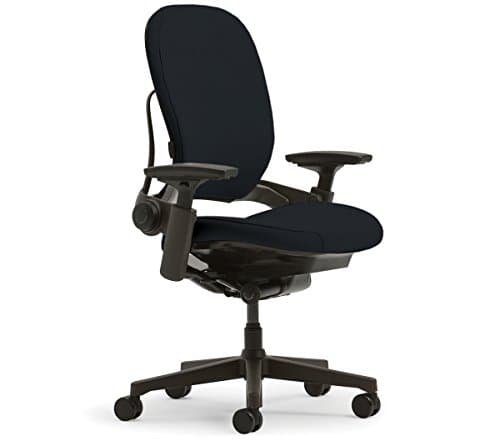
Steelcase Leap v2
The reason break-in periods go badly is usually that there was nothing to adjust, so day seven feels like day one. This chair gives you the opposite problem - enough controls that week one is genuinely a tuning week. The lumbar moves up and down and has a separate firmness dial, armrest height runs 7 to 11 in, seat height 16 to 20.5 in, and the recline tension adjusts. Steelcase publishes a 25 in backrest, a 19.25 in seat width, a 400 lb rating and a 12-year multi-shift warranty. Change one thing per day rather than everything at once. The pan is fixed at 15.75 in, so if depth is your issue, no amount of tuning will reach it.
Who it fits
Anyone who wants to be able to tune their way out of an initial ache rather than live with it.
Who it does not fit
Long-thighed sitters, and anyone under about 5 ft 1 in.
Published specifications
Seat height
16"–20.5"
Seat depth
15.75"
Seat width
19.25"
Back height
25"
Arm height
7"–11"
Weight capacity
400 lb
Lumbar
Height-adjustable lumbar plus a lower-back firmness dial
2. Best for Adjustable depth, which is what week one usually needs
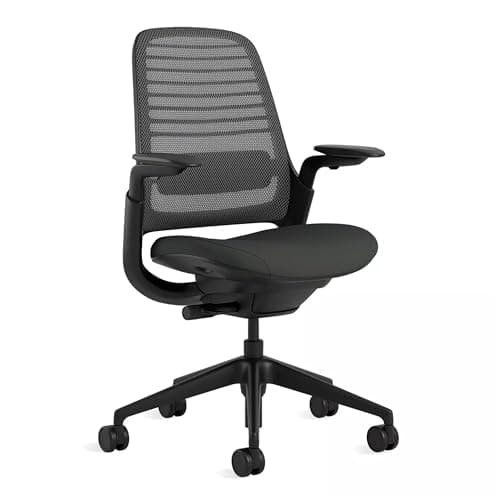
Steelcase Series 1
The most common week-one complaint we see is pressure behind the knees, and it is also the one complaint that genuinely cannot break in - a pan too long for your thighs stays too long. Steelcase publishes a functional seat depth of 15.5 to 17.75 in on the Series 1, which means that specific failure is adjustable away rather than permanent. Seat height is published at 16.5 to 21.5 in, with a 400 lb rating and a 12-year multi-shift warranty at mid-tier money. The adjustable lumbar is an option rather than standard, and Steelcase publishes no backrest height for it.
Who it fits
Anyone who has had a new chair press behind their knees before and wants that adjustable this time.
Who it does not fit
Anyone under about 5 ft 4 in, and anyone needing lumbar height adjustment as standard.
Published specifications
Seat height
16.5"–21.5"
Seat depth
15.5"–17.75"
Weight capacity
400 lb
Lumbar
Optional adjustable lumbar; weight-activated tension as standard
3. Best for Bridging a gap the new chair does not fill
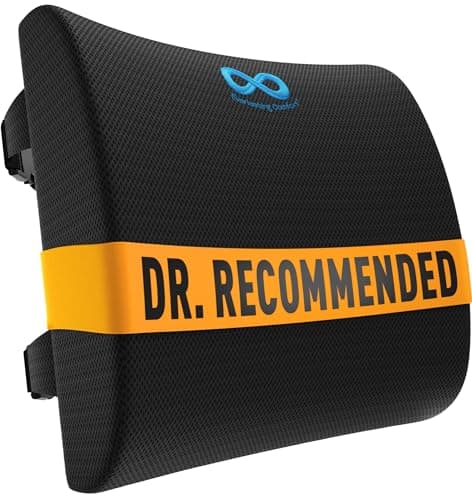
Everlasting Comfort Lumbar Support Pillow
Useful in week one for a specific situation: the new chair is structurally right but its fixed lumbar sits above or below your own curve, so your lower back aches in a chair that measures correctly. Everlasting Comfort publishes a 20.08 by 12.01 by 3.94 in contoured memory foam cushion positioned by two adjustable straps rated to chairs up to 32 in wide, with a stated lifetime replacement guarantee. Moving it up and down over a few days also tells you something worth knowing before your return window closes: whether lumbar height is the variable that matters for you, or whether it was never the problem.
Who it fits
Anyone whose new chair has a fixed lumbar in the wrong place for them.
Who it does not fit
Anyone whose new chair already has a height-adjustable lumbar - move that instead.
Published specifications
Lumbar
Fixed-contour memory foam; position set by two adjustable straps
How long does it take to get used to a new office chair?+
About a week of properly adjusted use. Most of what people call break-in is their own muscles adapting to a new posture, which takes a few days. The chair itself changes very little - foam softens slightly, and nothing else does.
Do office chairs break in?+
Only the foam, and only slightly. Mesh is tensioned at manufacture and is designed not to slacken. Seat height, seat depth, seat width and backrest height are fixed by manufacture and never change - which is why those are the figures to get right before you buy.
Why does my new office chair hurt my back more than the old one?+
Two likely reasons. Either it is set up wrongly - most chairs are never adjusted after assembly - or it is holding a position your old chair let you avoid, which produces mild new-location soreness that improves within days. Worse pain in the same place is a different signal, and it means the chair is not addressing your problem.
Is it normal for a new chair to hurt my tailbone?+
Common, and worth taking seriously rather than waiting out. A firmer pan than you are used to concentrates pressure at the sit bones and tailbone. If a week of correct setup does not settle it, that is a seat-pressure problem - what to do about a seat that is too hard and the coccyx page both address it.
When should I return a new office chair?+
When the problem is geometric and cannot be adjusted: feet that will not reach the floor at the lowest setting, or a pan that presses behind your knees and does not shorten. Those never improve. Decide inside the return window, not after it.